
Networks for multi-academy trusts
A trust's schools rarely share the same access options, the same contract dates or the same history. Edu24 joins them into one private network, so that shared systems are reached privately and every school is supported the same way.
One private network
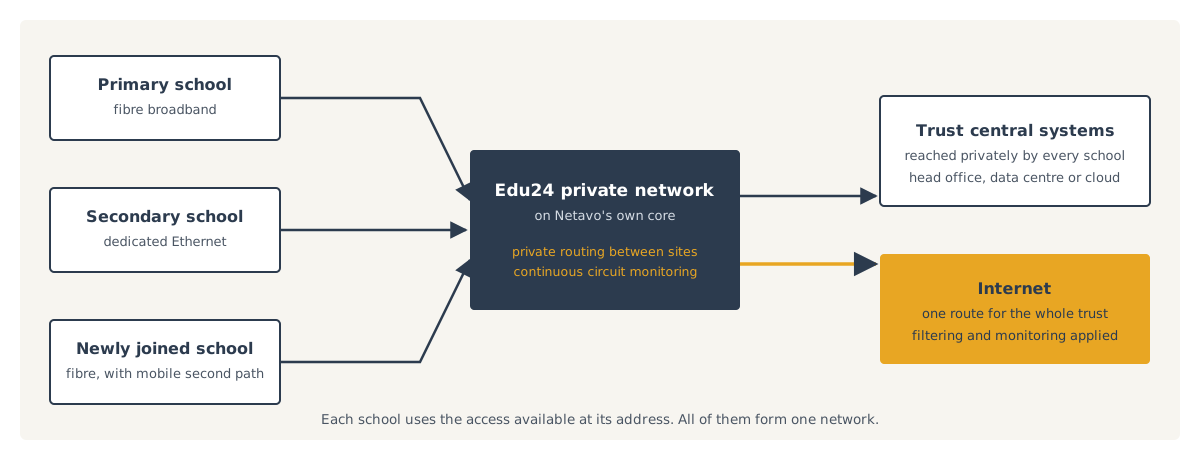
What a trust needs from its network
A trust needs its schools to reach shared systems privately, while accommodating whatever access is available at each address. It also needs the network to absorb change: schools joining, contracts ending at different times, and installation work that has to fit around the school calendar.
- Shared systemsReached privately by every school
- Mixed accessDifferent options at each address
- GrowthNew schools joining the trust
- TimingWork scheduled around the school calendar
How the network is built
| Requirement | How we meet it |
|---|---|
| Private access to shared trust systems | Private routing between schools and central sites on our own core network |
| Different access options across the trust | A private WAN combining the access types available at each address |
| High capacity between two key sites | Point-to-point connectivity between them |
| Consistent safeguarding | Filtering and monitoring applied across the trust |
| A backup connection | Mobile failover alongside each school's fixed access |
| Visibility of every circuit | Continuous monitoring of latency and loss with proactive fault management |
| One telephone system | Hosted telephony across the trust, with each school keeping its numbers |
Bringing a school onto the trust network
Survey
We establish the access available at the school's address and when its existing contract ends.
Design
Capacity, private routing and failover are agreed with the trust's IT team or partner.
Install
Installation and migration are scheduled to suit the school calendar, with number moves coordinated where telephony is included.
Operate
The school's circuits are monitored continuously, on the same footing as every other school in the trust.
Designed with the trust's IT team
The connectivity design is agreed with the trust's IT team or partner, alongside the systems they operate. Further schools are then added using the same design principles, so the network grows without being redesigned each time.
Network services →- Agreed withThe trust's IT team or partner
- Further schoolsAdded to the same design
Discuss a trust network
Tell us about the schools in the trust, the systems they share and any contracts approaching renewal. We will recommend a network approach.
Work with us →