Connection Diagnostics, Under Your Brand
A connection check your customers run under your name, on the web or in a Windows or macOS app. It tests the line, the local network and phone calls, explains what it finds in plain English, and gives your support desk the full report from a single reference, in Beacon, by API and by webhook.
How It Works
The same engine runs Netavo’s own Connection Health Check. Partner Branded puts it under your name.
Your Customer Runs the Check
On your check site, in your own website, or in your branded app on the computer at the site that has the problem.
They Get a Reference
Each result is explained in plain English at the end of the run, and the report is saved under a short reference to quote to your support team.
Your Desk Opens the Report
In Beacon, from a webhook as it arrives, or through the API into your own ticketing system, with the PDF in your brand.
You Start With Evidence
The first reply can address the cause, whether that is the router, the Wi-Fi, DNS, packet size or the line, rather than ask for more information.
Three Ways to Offer It
Start with the free Netavo check today, and move to your own brand when you are ready.
Netavo Branded
On check.netavo.com
Free
Ask a customer to run the check at check.netavo.com, or the Netavo Connection Health Check app for Windows or macOS, and send you the reference. You open the report and its PDF from the reference for 7 days.
Try the CheckPartner Branded
Hosted by Netavo
Pricing on Request
Your name, logo, colours, font and support contacts on the check, the apps and the PDF, on your own domain with one CNAME record. Reports are private to your staff by default, in Beacon and through the API and webhooks. We run the test servers.
Talk to UsPartner Branded
Self-Hosted
Pricing on Request
Everything in the hosted option, with the test servers, report store and check site running in your own network. Your customers’ reports stay on your servers, and Beacon reads them when your staff open one.
Talk to UsWhat Each Option Includes
The Web Check
Runs in the browser, with nothing to install, in about a minute.
| Feature | Free | Partner Branded, Hosted | Partner Branded, Self-Hosted |
|---|---|---|---|
| IPv4 and IPv6: whether each works, and which the device prefers | ✓ Included | ✓ Included | ✓ Included |
| DNS: which resolver really answers, and who runs it | ✓ Included | ✓ Included | ✓ Included |
| DNS: DNSSEC validation, large answers and IPv6 lookups | ✓ Included | ✓ Included | ✓ Included |
| Packet size (MTU) for IPv4 and IPv6 | ✓ Included | ✓ Included | ✓ Included |
| Latency, jitter and packet loss | ✓ Included | ✓ Included | ✓ Included |
| Well-known websites, and sites the customer names, re-tested from the test network | ✓ Included | ✓ Included | ✓ Included |
| Optional speed and bufferbloat test | ✓ Included | ✓ Included | ✓ Included |
| The check embedded in your own website | — Not included | ✓ Included | ✓ Included |
The Desktop App
For Windows and macOS. It adds what a browser cannot see: the computer, the local network and phone calls.
| Feature | Free | Partner Branded, Hosted | Partner Branded, Self-Hosted |
|---|---|---|---|
| Network adapters, addresses, gateways and error counters | ✓ Included | ✓ Included | ✓ Included |
| Wi-Fi signal, band and link rate, with an optional survey of neighbouring networks and roaming | ✓ Included | ✓ Included | ✓ Included |
| Proxy settings and hosts file entries | ✓ Included | ✓ Included | ✓ Included |
| DNS servers queried directly | ✓ Included | ✓ Included | ✓ Included |
| Ping to the router and the internet, and traceroutes | ✓ Included | ✓ Included | ✓ Included |
| TCP maximum segment size (MSS) on IPv4 and IPv6 | ✓ Included | ✓ Included | ✓ Included |
| SIP ALG check: a real SIP message compared as sent and as received | ✓ Included | ✓ Included | ✓ Included |
| Yealink phone provisioning (RPS and device management) reachability | ✓ Included | ✓ Included | ✓ Included |
| Router maker from its hardware address; model and line statistics where the router reports them | ✓ Included | ✓ Included | ✓ Included |
| Active VPNs, and more than one connection to the internet | ✓ Included | ✓ Included | ✓ Included |
| Connection monitor: watches the line for up to 24 hours first | ✓ Included | ✓ Included | ✓ Included |
| App name, icon and branding | Netavo | Yours | Yours |
| macOS app signed and notarised | ✓ Included | ✓ Included | ✓ Included |
Findings and Reports
| Feature | Free | Partner Branded, Hosted | Partner Branded, Self-Hosted |
|---|---|---|---|
| Plain-English findings, each graded by severity | ✓ Included | ✓ Included | ✓ Included |
| A report reference to quote to support | ✓ Included | ✓ Included | ✓ Included |
| PDF report | Netavo branded | In your brand | In your brand |
| Report open to anyone with the reference | For 7 days | Optional; private to your staff by default | Optional; private to your staff by default |
| Your own wording for any finding | — Not included | ✓ Included | ✓ Included |
| Checks made from outside your network flagged | — Not included | ✓ Included | ✓ Included |
| IPv6 judged in full, shown for information only, or left out | — Not included | ✓ Included | ✓ Included |
Your Brand
| Feature | Free | Partner Branded, Hosted | Partner Branded, Self-Hosted |
|---|---|---|---|
| Your name, logo, colours, font and support contacts | — Not included | ✓ Included | ✓ Included |
| Your own domain | — Not included | With one CNAME record | On your own servers |
| Test server names under your domain too | — Not included | Optional | ✓ Included |
| Branded Windows and macOS apps | — Not included | ✓ Included | ✓ Included |
| Demo mode on a Netavo subdomain while you evaluate | — Not included | ✓ Included | On a hosted demo |
Your Support Desk
In Beacon, the Netavo partner portal, and in your own systems.
| Feature | Free | Partner Branded, Hosted | Partner Branded, Self-Hosted |
|---|---|---|---|
| Every submission in a searchable table, with filters | — Not included | ✓ Included | ✓ Included |
| Attach a report to a support ticket | — Not included | ✓ Included | By reference |
| REST API: list reports, fetch one as JSON or PDF, erase one | — Not included | ✓ Included | ✓ Included |
| Webhooks when a report arrives, and when it finds a problem | — Not included | ✓ Included | ✓ Included |
| Retention | 7 days | 90 days by default, adjustable within limits | Your own policy |
Hosting and Data
| Feature | Free | Partner Branded, Hosted | Partner Branded, Self-Hosted |
|---|---|---|---|
| Test servers, report store and check site | Netavo’s | Netavo’s | Yours, in your network |
| Where reports are kept | Netavo | Netavo | Your servers; Beacon reads them on demand |
| An optional test server inside your own network | — Not included | — Not included | ✓ Included |
| Delivered as one container image, a .deb package or an appliance VM (Linux) | — Not included | — Not included | ✓ Included |
| Updates installed in your maintenance window, with automatic rollback | — Not included | — Not included | ✓ Included |
Pricing for both Partner Branded options is on request.
The Desktop App
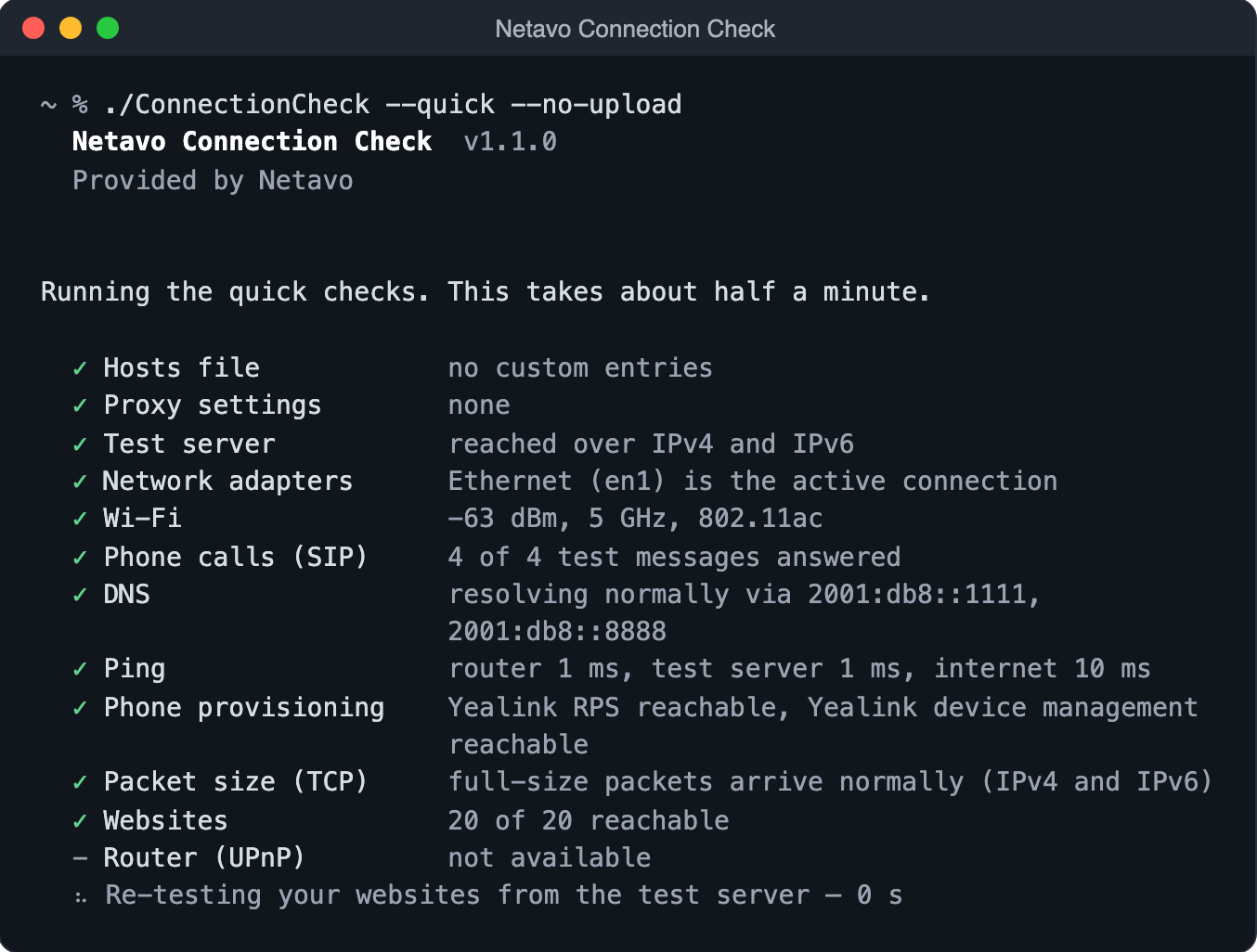
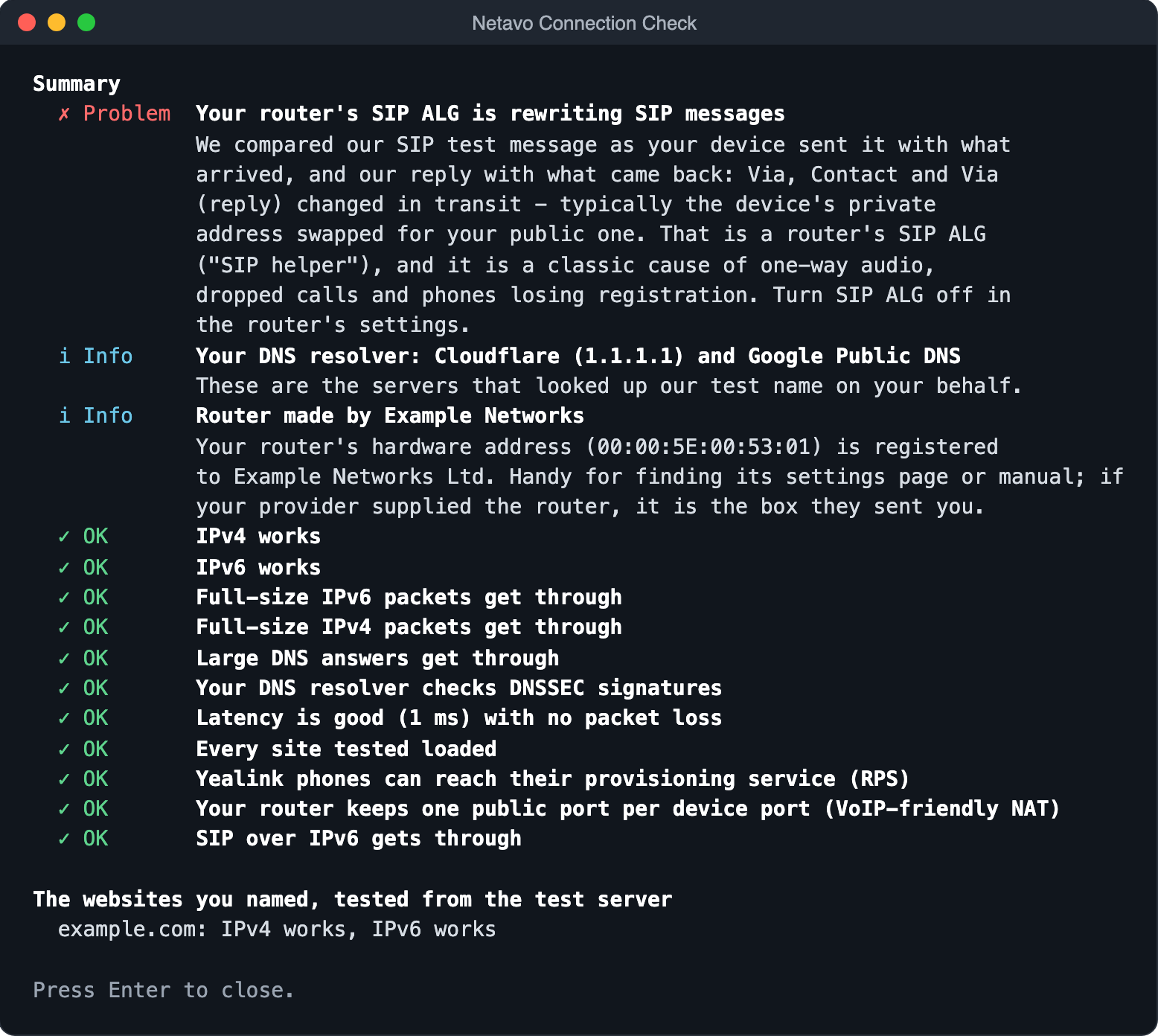
A command-line app for Windows and macOS that a customer, or your engineer on site, opens with a double-click. These are from a real run of the Netavo app on macOS.
Example Reports
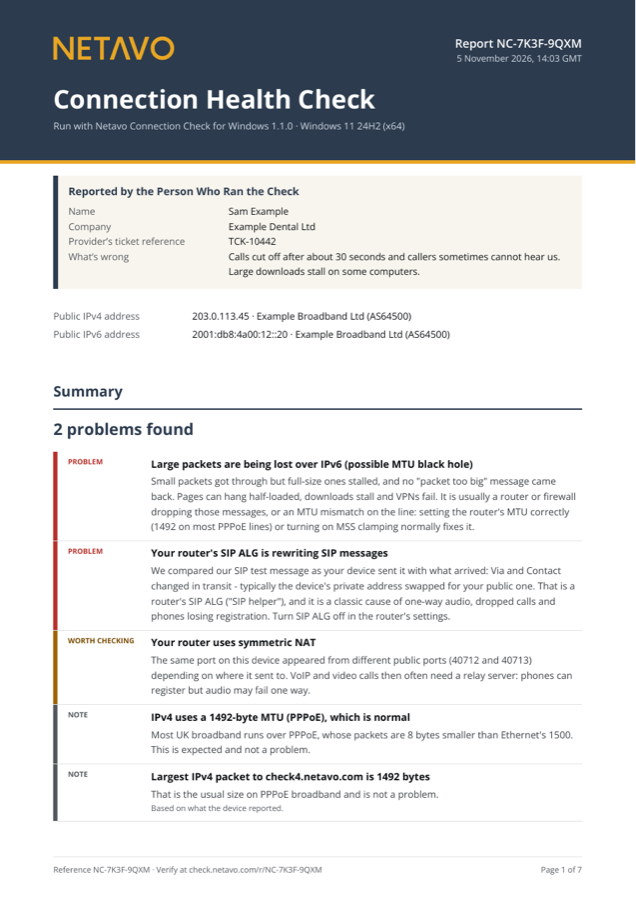
Two PDF reports made by the product’s own report engine from example data. Every address, name and reference in them is fictional.
 Example Report
Netavo Branded, Problems Found
A Windows app run at a dental practice whose calls cut off: the router’s SIP ALG rewrites phone calls, full-size IPv6 packets are lost, and DNS is answered by a third-party resolver.
Download the PDF (7 pages, 80 KB) →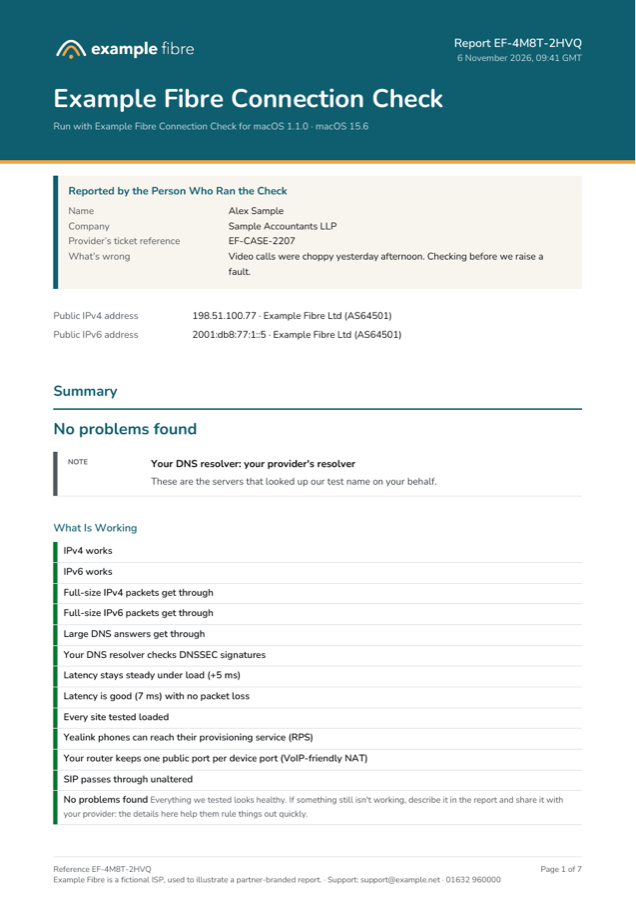 Example Report
Partner Branded, Healthy Connection
A macOS app run for Example Fibre, a fictional ISP: its logo, colours, font and support details throughout, and a connection that passes every check.
Download the PDF (7 pages, 98 KB) →What It Saves Your Support Desk
A ticket that says “the internet is slow” or “calls keep dropping” usually starts with questions. Which provider and public address? Wired or Wi-Fi, and how strong is the signal? Which router? Is it one computer or all of them, and which websites? What do a speed test, a ping and a traceroute show? Which DNS servers does the computer use? Is SIP ALG turned on? Is a VPN running?
Each answer means the customer finding a setting or running a command, often over a callback or several emails, and some of it, such as packet size or whether a router rewrites calls, they cannot easily find at all. A single run of the check collects all of it, and the reference brings it to the agent in one report.
An Estimate to Test Against Your Own Tickets
If gathering that information takes 10 to 20 minutes of agent time on a connection ticket, a desk handling 100 such tickets a month spends roughly 17 to 33 hours a month on it. With a report already attached, that time becomes reading one report. The figures are illustrative, not measured: multiply your own minutes per ticket by your own number of connection tickets to see what applies to you.
There are other effects, harder to put a number on: fewer engineer visits for faults that turn out to be the customer’s Wi-Fi or router, and fewer tickets passed between teams because nobody could tell where the fault was.
Into Your Own Systems
Every report made under your brand is available through the Netavo public API, so it can land in your own ticketing or CRM system without anyone copying it across. A webhook tells your systems when a report arrives, and again when it finds a problem.
Read the API Reference →- List reportsPaged, filtered by date, severity, app or web, address or text
- Fetch a reportThe full report as JSON, or your branded PDF
- Erase a reportAhead of your retention period
- WebhooksSigned; a report received, and a report with problems
- AccessAPI tokens with their own scopes, created in Beacon
Self-Hosted, in Your Own Network
For an operator that wants the test servers on its own network, or must keep customer data on its own servers, the whole service runs as one install: the test servers, the report store and the branded check site. A test server can also sit inside your access network, so a check can tell your network from the wider internet.
Beacon connects to your install over an outbound connection that your install opens, reading a report only when one of your staff opens it. Updates install themselves in a maintenance window you choose, with a backup, a health check and automatic rollback.
Talk to Us About Self-Hosting →- PackagingOne container image, a .deb package or an appliance VM
- PlatformLinux
- Your dataStays on your servers
- UpdatesIn your maintenance window, with rollback
- PricingOn request
Frequently Asked Questions
What Is Netavo Connection Diagnostics?
Netavo Connection Diagnostics is the Connection Health Check offered under your own brand. Your customers run a web check or a Windows or macOS app, get a report reference, and your support desk sees the full report, with plain-English findings, in Beacon, by API and by webhook.
How Much Does It Cost?
The Netavo-branded check is free. Partner Branded, hosted by Netavo or self-hosted, is priced on request: talk to us about your volumes and we will quote.
Can Our Customers Use It Without Installing Anything?
Yes. The web check runs in the browser in about a minute. The Windows and macOS app adds the checks a browser cannot run, such as the local network, Wi-Fi, traceroutes and the SIP ALG check.
Who Can See a Customer’s Report?
With Partner Branded, reports are private to your staff by default and are kept for 90 days unless you choose otherwise within the limits. You can choose to let anyone holding the reference open a report. The free Netavo check opens to anyone with the reference for 7 days.
Can We Run It on Our Own Servers?
That is the Self-Hosted option: the test servers, report store and check site run in your network, delivered as one container image, a .deb package or an appliance VM for Linux, and your reports stay on your servers. Beacon reads them when your staff open one.
Put Your Name on the Check
Tell us how many customers you support and how your desk works today. We will set up a demonstration with your branding and quote for the option that suits you.